You're Visitor #
Nothing here is copyrighted -- I'd be honored if you'd reuse anything here for your website
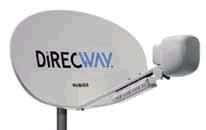
If you need to do everything there is to do on the internet, and/or if you need continuous reliable access, and you're not staying at one site for an extended period, and you can afford it, satellite is the way to go. Satellite used to be very expensive, both the initial cost and the monthly cost, but the prices continue to drop. As of 2005, you can get satellite service for $1,300 plus $59.95 a month -- no per-minute charge! That's great news! For details, check out 2waysatlink.com and/or MaxwellSatellite.com. AND, for a few extra dollars, you can actually get DirectTV combined in the same antenna with your internet access! Sounds like a great alternative for those who can't wait a couple of years for WI-FI to connect our world.
Satellite

On-Site Phone
Here's a fairly reasonably-priced way to get service that allows you to do everything on the internet, but it requires that you camp in one spot for an extended period of time. At many campgrounds, you can get phone service installed at your campsite for about $25-$45. It generally takes a couple of days to get it, so it probably isn't worthwhile unless you plan to stay put for several weeks and you don't want to attempt any of the other options -- or you really want to play games and spend time in chatrooms.
WiFi
If you're here looking for information on equipment (WiFi cards, etc.), CLICK HERE TO SCROLL DOWN.
For details on the Verizon 4G Mobile HotSpot, CLICK HERE TO SCROLL DOWN.
Wireless Fidelity (WiFi) is emerging as possibly the best access method for RV travellers. If you haven't heard about WiFi, you soon will. It's also known as 802.11b and Mac users call it AirPort. I've recently also noticed 802.11g and 802.11n -- more coming along every day. Whatever you call it, WiFi is basically a wireless radio-type connection to a high-speed internet service, such as DSL, satellite, or cable modem. It requires that you have an 802.11 card in your computer and be in range of a WiFi HotSpot. Most of the brief description above came from a competitor's website. You'll find a list of campgrounds that have WiFi Hotspots in several locations, but the most popular at the present time is Chuck Woodbury's website. Below, I've included a list of WiFi HotSpot Locators.
People seem confused about what they need to access WiFi, so I thought I'd put my recommendations here. If you've got a newer laptop, your WiFi antenna is included. If you have a really old laptop or a desktop computer, you will need to purchase a WiFi card. I've tried several, ranging from $50 to $100 - see more detail on that below. It's obviously up to you on how much you want to spend. What you need depends on where you'll be using your system. If you're always inside a Starbuck's, the cheapest will probably do fine. If you're in the outer reaches of a campground with WiFi, the antenna might be needed.
As I said on the main page -- At many RV resorts, you'll find private individuals that have their broadband DSL or cable modem set up such that it can be accessed free with your WiFi card. You can find these by simply setting up your computer with the WiFi capability, then opening your Browser to see if you have a connection. Another way to find them is using one of the WiFi HotSpot finders. There are many out there, but the free one that I use is NetStumbler. Click the NetStumbler image below to go to their site for a free download. Their website is also a good source of WiFi news, forum, and more elaborate software that you can purchase.


Internet-On-The-Road (IOTR)

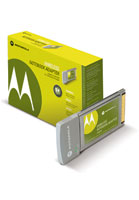
Motorola $42 card from Walmart
WiFi HotSpot Locator Websites:
http://www.wififreespot.com/ (find free campgrounds,
hotels, restaurants, etc.)
And here's one that lists many sources,
including most of those above : http://www.eweek.com/

Click for NetStumbler.com
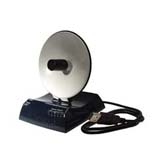
Hawking HWU8DD for $68.89
from CircuitCity.com
(search for "HWU8DD")
OOPS! NO LONGER AT CIRCUIT CITY. TRY HAWKING WEBSITE, WHERE YOU'LL FIND LINKS TO ONLINE RESELLERS AND THE HAWKING STORE
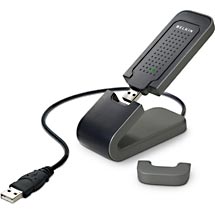
Belkin Wireless G Plus MIMO USB Network Adapter, F5D9050 about $49.95 at Walmart

I haven't tried the Wi-Fire, but have seen a lot of chat about it on Forums.
WiFi cards below aren't needed on laptops sold after about 2008. They can be used for desktop computers.
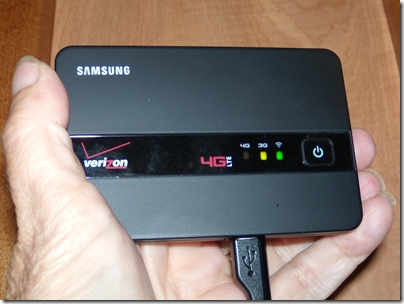
Verizon 4G Mobile Hotspot
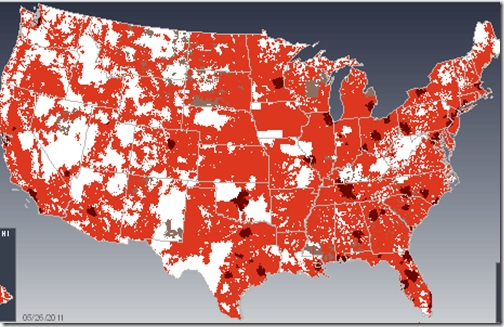
June 2011: I just read an article about this relatively new capability. I've included a photo of it below, along with a map of the Verizon 3G and 4G coverage (dark blotch=4G, red=3G, white=nada).
In summary, at 4G, you can get speeds like 9MB down/ 1+ MB up. 278k down/110k up at 3G. Costs vary according to your usage, with 5GB/month for $50, 10GB/month for $80, and $10/GB for overage. For details, check the article at DigitalRV.RVtravel.com. Keep in mind that this technology is changing rapidly, so speeds and prices will change.